Design pattern

Concept

Designing with design patterns in UX/UI

A design pattern is a proven solution to a design problem that comes up from one interface to the next. The breadcrumb trail for finding your way around a tree structure, the confirmation dialog before a deletion, the accordion that folds up an FAQ, all of them answers that thousands of products adopted before they turned into reflexes for users.

Their strength comes precisely from that familiarity. A user spends most of their time on services other than the one they are using, and they arrive with expectations already formed about how an interface should behave. Relying on a known pattern means drawing on what they already know how to do, rather than making them learn something new.

A design pattern is not the component that embodies it. The pattern is the principle behind the solution, independent of any technology, while the component is its concrete implementation in a given interface. That is the logic that connects patterns to design systems, where they are documented, supported by tools and paired with usage rules.

What is it for?

  • Reusing proven interface solutions rather than reinventing what already works
  • Reducing the learning effort asked of users, who recognise a behaviour they have already met elsewhere
  • Sharing a common vocabulary between designers and developers ('breadcrumb', 'modal', 'accordion')
  • Speeding up design work by building on blocks whose behaviour is predictable
  • Assessing an existing interface against the conventions users already know

What you need to know

  • A pattern is justified as long as it serves the need well
  • Jakob's law, formulated in 2000 by Jakob Nielsen: users arrive with expectations already formed elsewhere
  • Innovating is only justified where existing patterns fail, on a new problem or a genuine point of friction
  • Departing from them has to bring a benefit greater than the learning cost it imposes on the user
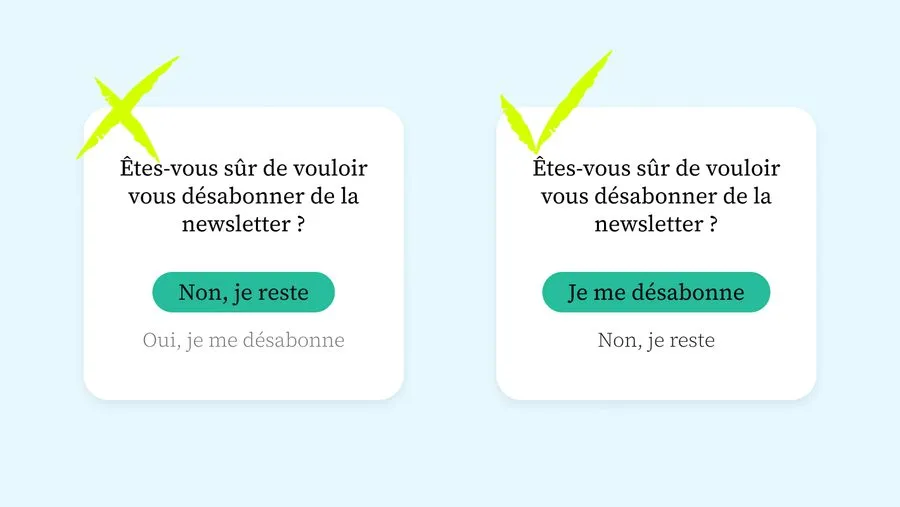
  • A pattern's familiarity does not make it neutral: some widespread ones serve interests that run counter to those of the user (the 'dark patterns')

How do you choose the right design pattern?

A pattern is not applied mechanically. The right choice depends on the context, the content and the habits of the users you are designing for.

01

Start from the problem, not the solution

A pattern answers a specific interaction problem: finding your way, entering data, confirming, comparing. You state that problem first, before going through the patterns that answer it, otherwise you pick a fashionable solution for a need it does not serve.

02

Compare the candidate patterns

Several patterns often answer the same need. Long content lends itself better to an accordion than to tabs, and a secondary or tertiary action does not call for the same treatment as a primary one. You weigh the options against the density of the information, the frequency of use and the constraints of the interface.

03

Take the device and its conventions into account

Habits differ between the web and mobile, and between systems. A pattern that works well on a website can be disconcerting in an app, where users expect the conventions of their operating system.

04

Check with users when in doubt

When two patterns are equally good on paper, a quick test settles it better than a discussion. Half a day of testing on two competing options often reveals which one is understood without effort.

Frequently asked questions

Design system

A design system is a component library and the governance that comes with it. What sets it apart from a design kit, and when it becomes necessary.

Read more about Design system

Design Kit

The design kit, or UI kit, brings together a product's components in a design file: buttons, forms, cards, navigation, icons.

Read more about Design Kit

Affordance

Affordance is the ability of an interface element to suggest its use. Donald Norman popularised the concept: only perceived affordance counts.

Read more about Affordance

Dark patterns

Dark patterns are interfaces designed to manipulate. From the confusing cookie banner to the subscription trap, the European DSA has banned them since 2023.

Read more about Dark patterns

Interface design

UI design shapes the visual layer of a product: layout, colours, typography, components. It turns the experience into tangible elements.

Read more about Interface design

High-fidelity mockups

High-fidelity mockups give the future screens their final form, to hand over to the project teams for integration.

Read more about High-fidelity mockups

Cognitive psychology

Cognitive psychology studies how the brain processes information. Memory, attention, perception: the scientific foundations of UX design.

Read more about Cognitive psychology

Usability

Usability measures whether a product lets its users reach their goals with effectiveness, efficiency and satisfaction, as defined by the ISO 9241-11 standard. An essential component of UX.

Read more about Usability

Curious to learn more about us?

Everyone talks about user experience, service design, ergonomics...
It's not always clear, and you'd like to find out, or sharpen what you already know.

Let's talk